
[Active Learning] Group work becomes incredibly smooth! 3 typical desk arrangements and tips for their implementation.
As active learning becomes more widespread, I think opportunities for group work are also increasing.
In group work, selecting the appropriate desk arrangement based on the purpose and activity is crucial for enhancing learning effectiveness. The arrangement alone can significantly impact students' concentration and ease of communication. Furthermore, with the recent increase in ICT use and online international exchange, seating arrangements that accommodate the use of digital devices are becoming increasingly important.
This article outlines the characteristics, advantages, and points to note for three representative basic layouts and two advanced layouts for incorporating online interaction.
Three typical desk arrangements
1. "Pair type"
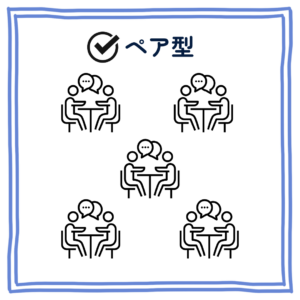
This format maintains the usual lecture style but involves students forming pairs with the person sitting next to them or in front of or behind them.
Benefit 1: "Zero-second switching" that doesn't cut into class time.
Since you normally sit facing forward, you can start working immediately just by turning to the side or looking behind you the moment you receive an instruction. There's no need to move your desk or waste any time.
Benefit 2: Smooth transition between lectures and activities
The transition between "listening to the teacher's explanation (input)" and "discussing in pairs (output)" is smooth. Active learning can be easily incorporated as an extension of regular lessons, such as by asking students to "explain the solution to the problem you just solved to someone nearby."
Benefit 3: Low psychological barrier for students.
In group activities with 4-5 people, some students may feel hesitant to speak up, but working in pairs makes it easier for them to express their opinions without feeling nervous.
important point:
Because everyone is seated facing forward, this arrangement is not suitable for group work such as poster making or discussions among multiple people.
2. "Island type (group type)"
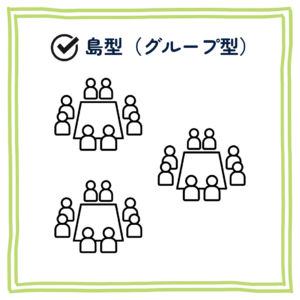
This is a typical group work format where 4 to 6 desks are placed facing each other, creating several "islands."
Benefit 1: It's easier to see each other's faces and have discussions.
Because group members sit facing each other, it's easy to make eye contact, making it suitable for collaborative work and group discussions. It's ideal for preparing poster sessions or tasks where everyone needs to look at a single document together.
Benefit 2: Role-sharing fosters cooperation and collaboration.
Because it requires dividing roles and tasks within a group, participants can learn to take responsibility within a group and develop collaborative skills by supporting each other.
Benefit 3: It's easy to see the progress of each group.
Because the entire class is divided into several "islands," it becomes easier for the teacher to quickly grasp at a glance from the teacher's desk which groups are progressing and which groups are stuck.
important point:
It is not recommended to write on the board or give a general explanation in this arrangement, as many students will be facing sideways or backwards, which can easily lead to decreased concentration and private conversations. If there is a lecture period, it would be best to have them return to their original positions or at least have them face forward in their chairs.
3. "U-shape"
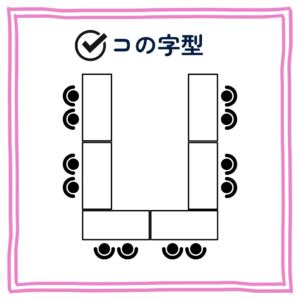
This arrangement involves arranging desks along the classroom wall in a large "U" shape. A similar arrangement is the "circle arrangement," where chairs are placed in a circle.
Benefit 1: Suitable for group discussions and presentations.
Because you can see the faces and expressions of everyone in the class at a glance, you can immediately tell who is speaking. It's ideal for lessons where you want to exchange opinions and deepen discussions not only within specific groups, but also with the entire class.
Benefit 2: Creates a healthy sense of tension
Unlike lecture-style or other small-group settings, everyone is part of the same group, making it less likely for the lesson to feel like someone else's problem and fostering greater engagement.
Benefit 3: Easier to accommodate "whiteboard writing and overall explanations" than island-style classrooms.
Compared to the "island" layout, the "U-shape" layout has the advantage that you can see the blackboard and the teacher just by turning slightly to the side, making it easier for everyone to receive instructions even in the middle of group work.
important point:
When there are many people, it can be difficult to hear those who are far away, so caution is needed. Also, the tension created by the "U-shape" arrangement can conversely become a source of pressure. If the students are not yet very close, it is more effective to start with the "pair" or "island" arrangement.
Strategies for online and international exchange
1. "Lecture-style" + "Individual online (one tablet per student)"
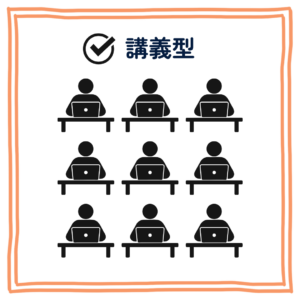
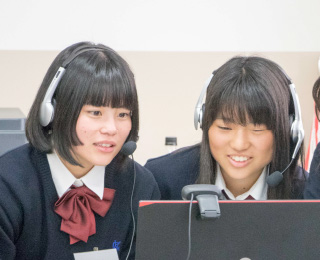
The format involves everyone remaining in their usual lecture-style seating arrangement, but each person using a tablet and headphones to connect online. Group work will be conducted online using breakout rooms and other meeting tools.
Benefit 1: Images and audio can be shared clearly.
The "one device per person + everyone wearing earphones" method reduces the likelihood of feedback (where the microphone picks up the voice of the person next to you), and ensures that each person's voice and video are transmitted clearly, making smoother communication easier.
Benefit 2: Makes it easier to provide subtle, individualized support.
Especially in international exchanges using English, teachers and assistants can discreetly send hints to struggling students using the "chat function," allowing for individual support without others noticing.
important point:
Even though all classmates are in the same classroom, everyone is wearing earphones and facing their screens, which inevitably creates an unnatural feeling of being separated from one another despite being in the same space.
2. "Island-type setup with 3 people side-by-side" + "Collaborative online (3 people, 1 tablet)"
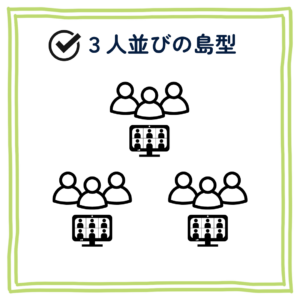
This setup utilizes an island-style layout, with three people sitting side-by-side at a single table and sharing one tablet. They use a splitter-type sharing earphone or similar device to listen to the same audio simultaneously.
Benefit 1: It's easier to cooperate and support each other among the three of you.
Because it's a small group, everyone has a chance to speak. You can not only talk to the person on the other side of the screen, but also have a quick chat with the student next to you, and if you get stuck for words while talking to your online partner, you have the reassurance that the two people next to you can immediately offer help.
Benefit 2: Collaborative work is promoted through division of roles.
This setup also allows you to take advantage of the benefits of a single-person group, such as having one person talk to an online partner while another person takes notes while viewing the shared screen.
important point:
Compared to when each person has their own equipment, equipment-related problems such as earphone splitter cables and microphone connections are more likely to occur. Also, depending on how the small group of three people is divided, there is a concern that some students may feel uncomfortable talking to each other depending on their compatibility.
Summary
So far, we have looked at the advantages and points to note regarding the three basic seating arrangements for traditional in-person classes and the two arrangements for online communication using ICT.
Each arrangement has its pros and cons, and there is no single "absolute correct answer."The key is to appropriately select and combine the optimal arrangement based on the goals of the day's lesson (whether it's mainly lectures, collaborative work, or a combination of input and output), the characteristics of the teaching materials, and the students' proficiency levels and relationships..
Especially when using online methods, it's crucial to be flexible and adapt to the situation, taking into account risks such as equipment malfunctions and the psychological distance between students. Based on the characteristics of each method described in this article, try to create a space that leads to the deepest learning for the students in front of you.
For teachers who are wondering, "What is the best desk arrangement and ICT utilization method for my class?"
We can propose international exchange programs tailored to the ICT environment and specific circumstances of each school.
Please feel free to contact us if you have any questions, such as "I'd like to learn about group work examples from other schools" or "I'd like to know about the costs involved in implementation." Our staff, who are well-versed in the school environment, will propose a support plan to reduce the burden on teachers.
Contact Us: https://withtheworld.co/contact/
note: https://note.com/shunta_igarashi
X: https://x.com/withtheworld_42
Instagram:https://instagram.com/withtheworld.official
Facebook:https://www.facebook.com/WithTheWorldInc/